

Key Takeaways
- Transform old phones into home security cameras: Repurpose your device with free apps to monitor entrances, pets, or any indoor space, making home security accessible without extra hardware.
- Create custom smart displays from scratch: Use your retired phone as a mini dashboard for weather, calendars, or news, bringing essential information front and center wherever you need it.
- Boost energy savings with DIY smart sensors: Convert your phone’s sensors (camera, microphone, accelerometer) into motion detectors or environmental monitors to automate lights or regulate temperature, helping save on both energy and costs.
- Set up instant smart intercoms for seamless communication: Use old phones as two-way audio or video intercoms. This is perfect for family alerts, baby monitoring, checking in on loved ones, or communicating across rooms.
- Automate routines with dedicated remote controls: Transform your device into a universal smart home remote for controlling lights, media, or thermostats, so you never have to juggle multiple remotes again.
- Give kids a safe starter device: Prepare an old phone with only approved educational apps or a smart nightlight setup, providing little ones with safe and supervised tech access.
- Unlock hidden value and sustainability: Every repurposed phone reduces e-waste and saves you money on new gadgets. That’s a win for your wallet and the environment.
These practical, creative hacks make reusing your old phone both powerful and approachable. Now, let’s break down each strategy with step-by-step guides and real-world ideas that make your home smarter, safer, and more sustainable.
Introduction
That forgotten smartphone at the bottom of your drawer holds more potential than you might expect. Instead of letting it collect dust or contributing to tech landfill, you can breathe new life into your old phone by transforming it into a powerful smart home tool. No complex programming, advanced skills, or expensive systems required.
A single device can unlock new levels of home security, organization, automation, and savings while keeping your tech footprint eco-friendly. Wondering how yesterday’s phone can become tomorrow’s essential smart home upgrade? Dive in for detailed, step-by-step DIY projects that bring professional-grade convenience and peace of mind to your everyday life.
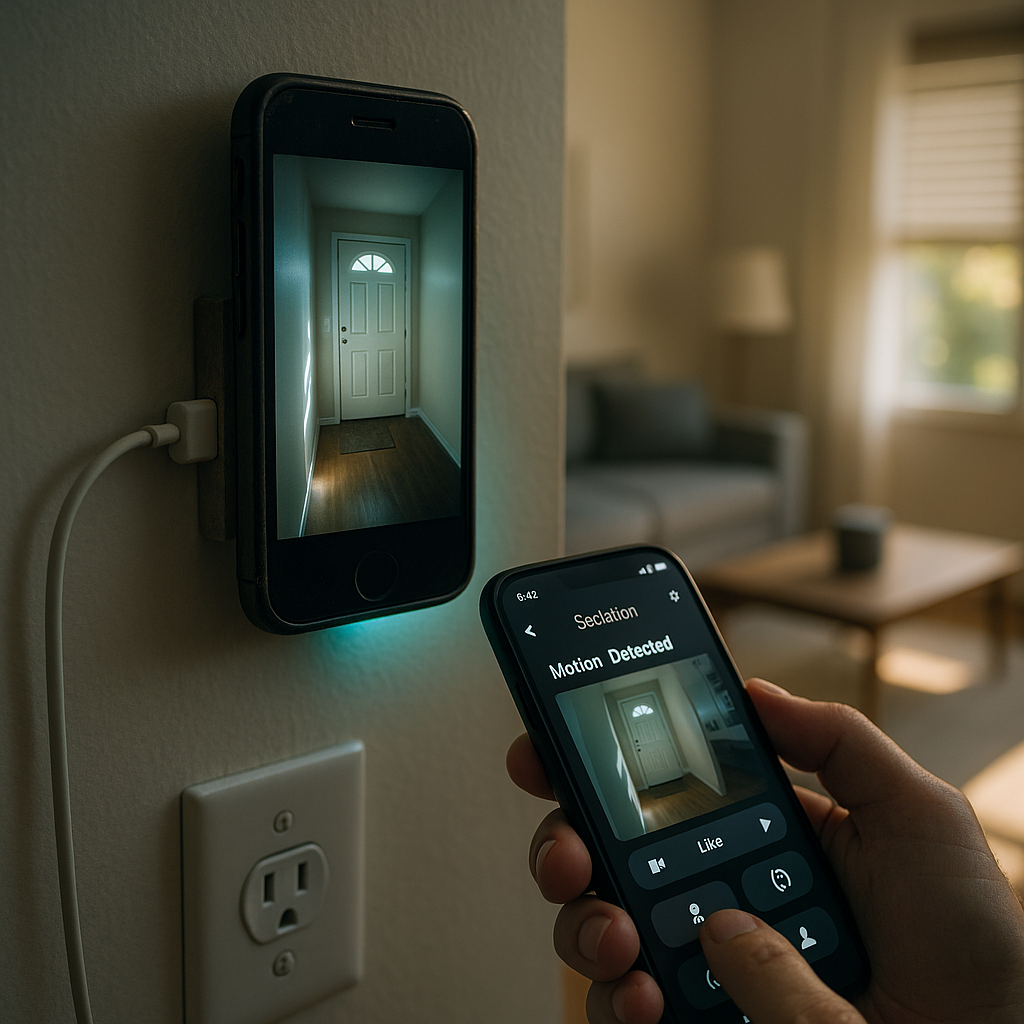
Transform Your Old Phone into a Home Security Camera
Upgrading your home security doesn’t have to mean investing in costly new gadgets. With your retired smartphone, you can create a robust, customizable surveillance system that fits your needs and budget.
Un passo avanti. Sempre.
Unisciti al nostro canale Telegram per ricevere
aggiornamenti mirati, notizie selezionate e contenuti che fanno davvero la differenza.
Zero distrazioni, solo ciò che conta.
 Entra nel Canale
Setting Up Your DIY Security Camera
- Select the Right Security App:
- Alfred Camera: A user-friendly option with dependable motion detection and instant alerts
- Haven: Prioritizes privacy with encrypted video feeds and advanced sensors
- IP Webcam: Suits power users seeking maximum customization and streaming options
- AtHome Camera: Designed for multi-device monitoring and remote access
Each app offers distinct advantages, but Alfred Camera stands out for beginners thanks to its easy setup and reliability. By leveraging free or low-cost software, many users report cutting security camera expenses by up to 90 percent while maintaining the crucial features found in commercial systems.
Installation and Configuration Tips
Your old phone, turned security camera, works best when thoughtfully installed. For optimal performance:
- Mount the device 4–6 feet from the floor to capture key entry points with a wide field of view.
- Avoid placing it in direct sunlight or near sources of moisture.
- Ensure a strong WiFi connection (aim for signal strength better than -70dBm) to prevent video interruptions.
- Use a dedicated charger and (if possible) invest in a surge protector to provide 24/7 power.
- Tilt the camera at a gentle 15-degree angle downward to improve motion detection.
Prolong your device’s lifespan by turning on dark mode and lowering the screen brightness to 30 percent. Disable aggressive battery optimization to keep your camera online around the clock.
Create a Custom Smart Display Dashboard
An old smartphone can double as a smart home display, providing critical information at a glance and keeping your entire household organized.
Essential Dashboard Components
Weather and Calendar Integration:
- Install apps such as Weather Timeline for reliable forecasts.
- Sync Google Calendar for everyday scheduling and appointment reminders.
- Add smart home widgets (like those from Home Assistant) to check device statuses in real time.
- Curate news feeds with Flipboard widgets to keep current on headlines.
Power Management and Visibility:
- Use Fully Kiosk Browser for a streamlined, always-on dashboard interface.
- Activate “Stay Awake” in the device’s developer options to stop the screen from sleeping.
- Try MQTT Dash to display smart sensor and automation data.
- Set up automatic night mode or dimming to avoid light pollution in darker spaces.
Mount your repurposed dashboard in high-traffic areas, like the kitchen, hallway, or entryway, where it’s easy for everyone to consult throughout the day. Households that adopt custom displays report checking them up to a dozen times daily, streamlining family communication and daily planning.
Beyond the home, these displays can also serve practical purposes in small businesses (for meeting schedules), classrooms (as digital bulletin boards), or healthcare settings (for shift or appointment updates).
Boost Energy Savings with DIY Smart Sensors
Older phones contain an array of built-in sensors that can be harnessed for powerful home automation and energy management. No additional purchases required.
Leveraging Your Phone’s Sensors
Applications across the home and beyond:
- Use the ambient light sensor to automate lighting in hallways, kids’ rooms, or workspaces.
- Rely on the accelerometer to detect movement, triggering alerts or security lights when needed.
- Tap into the temperature sensor for smarter climate control in bedrooms, offices, or server rooms.
- Repurpose the microphone for noise monitoring, helping maintain quiet in nurseries, libraries, or shared study spaces.
Connect your phone’s sensors to existing smart home systems using automation apps such as Tasker, MacroDroid, or IFTTT. You can design fully custom “if-this-then-that” scripts and conditions that fit unique needs, whether at home or even in small offices. Many users experience up to a 25 percent reduction in energy costs by automatically managing lights, heating, and other electronics based on motion or environmental changes.
This approach isn’t limited to the smart home. Similar techniques are used in retail for occupancy detection, in healthcare for patient monitoring, and in educational environments to control energy use in classrooms or labs.
Set Up Instant Smart Intercoms for Home Communication
Turning old phones into intercoms supercharges communication around the house. Perfect for families, roommates, or multi-level homes.
Implementing Your Intercom Network
Top Communication Apps:
- Zello PTT: Fast, walkie-talkie-style voice communication.
- Google Duo: Crisp video calling across devices.
- IntercomApp: Designed specifically for home intercom setups with multi-room options.
- Team Speak: Great for creating a connected network in larger or multi-floor environments.
Optimize devices by:
- Enabling auto-answer, so anyone can reach rooms instantly.
- Grouping devices by floor or function (such as kitchen, nursery, or study).
- Setting up push-to-talk for extra privacy.
- Configuring emergency broadcast channels that notify the whole household at once.
Users find that these DIY intercoms cost a fraction of specialized systems, with average savings of $200 to $300, and deliver better flexibility through app integrations. The same concept is being adapted in educational settings for school-wide announcements and in small businesses for efficient staff communication.
Un passo avanti. Sempre.
Unisciti al nostro canale Telegram per ricevere
aggiornamenti mirati, notizie selezionate e contenuti che fanno davvero la differenza.
Zero distrazioni, solo ciò che conta.
Entra nel Canale
Automate Routines with a Dedicated Remote Control
Expanding beyond standard smart home applications, an old phone becomes the ultimate universal remote. Instead of juggling multiple remotes, control lights, speakers, entertainment systems, or thermostats from a single streamlined device.
How to Set It Up:
- Use apps like AnyMote, Unified Remote, or custom smart home system integrations (such as Samsung SmartThings or Google Home).
- Organize shortcuts for one-touch scene changes, like movie mode, bedtime, or away status.
- Set up NFC tags throughout the house for tap-to-activate automations.
Families report higher device adoption rates when controls are centralized and mobile, making routine tasks and energy-saving schedules more seamless.
Give Kids a Safe Starter Device
Repurposing an old phone as a child’s first tech device provides independence and learning opportunities while ensuring parental control.
Child-Friendly Applications:
- Lock down the device with only approved educational apps and eBooks.
- Convert it into a smart nightlight or white-noise machine using apps like Night Light or Calm.
- Use parental control apps to manage screen time, app access, and ensure internet safety.
This approach offers affordable access to education, entertainment, and digital safety, whether at home, in schools, or for travel.
Unlock Hidden Value and Sustainability
Every phone you repurpose prevents a device from ending up in the landfill, making a tangible difference for the environment while saving money on new gadgets. The DIY approach inspires creative problem-solving and demonstrates that cutting-edge convenience does not have to come at a high cost to the planet.
Businesses, schools, and eco-conscious households alike have reported fewer new device purchases by reusing old hardware for routine tasks, further reducing electronic waste and extending the lifecycle of technology in practical ways.
Conclusion
Repurposing your old smartphone opens the door to a world of smart home possibilities, transforming forgotten tech into powerful, sustainable solutions for home, work, and everyday life. These hands-on projects empower you to enhance home security, streamline daily routines, save energy, facilitate communication, and provide safe, supervised digital experiences for kids—all without breaking your budget or adding to e-waste.
As technology continues to evolve, the real advantage comes from adapting creatively and maximizing the resources you already have. The future of smart living belongs to those who see potential in what others consider obsolete, harnessing innovation to meet the shifting demands of modern life. Now, the question is not just how to use your retired phone, but how many ways you can personalize it to unlock convenience, security, and value in your connected world. Take control, experiment boldly, and let your old device be the foundation of your next leap toward a smarter, greener home.




Leave a Reply