

Key Takeaways
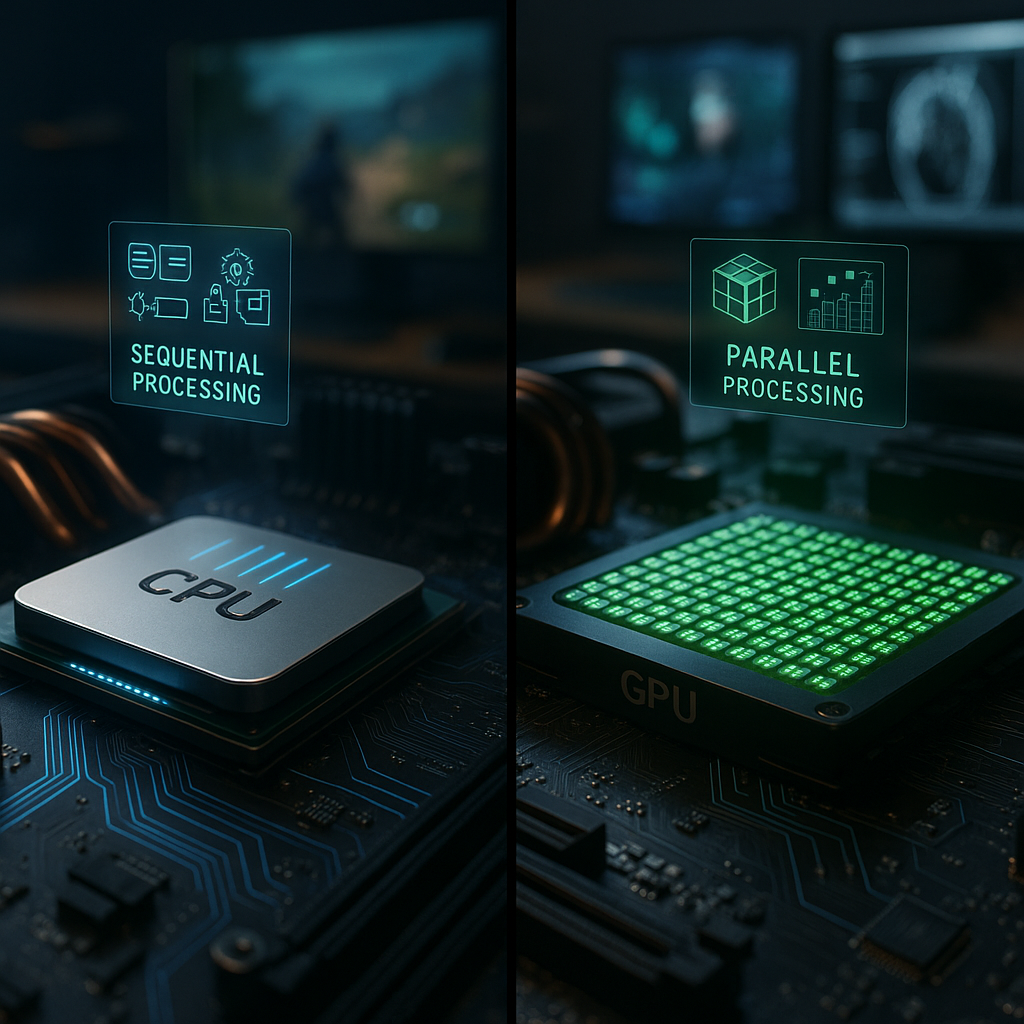
Understanding the distinct roles of CPUs and GPUs is essential for anyone aiming to optimize computing performance, from everyday users to industry professionals across fields like education, healthcare, gaming, finance, and research. The following key takeaways clarify the differences, highlight how these processors collaborate, and empower you to make smart choices for your specific computing requirements.
- CPUs excel at sequential, versatile processing: Central Processing Units (CPUs) are engineered for broad, general-purpose tasks. Their strength lies in executing instructions in sequence, making them indispensable for day-to-day computing, running operating systems, and handling applications that require flexibility, such as web browsing, document editing, and complex business software.
- GPUs offer unmatched power for parallel workloads: Graphics Processing Units (GPUs) specialize in handling thousands of operations simultaneously. They are the go-to processors for graphics rendering, immersive gaming, advanced data analysis, scientific research, AI development, and applications in healthcare imaging or financial modeling that benefit from high-volume parallel processing.
- Architectural design shapes task performance: CPUs typically feature a handful of powerful, adaptable cores optimized for intricate, conditional operations. In contrast, GPUs contain many simpler, specialized cores that handle repetitive, parallel tasks with exceptional speed and efficiency.
- Synergy (not rivalry) drives modern computing: Rather than competing, CPUs and GPUs now operate synergistically. CPUs manage complex logic and system orchestration. GPUs take charge of heavy-duty computations for applications such as video rendering, machine learning, fraud detection in finance, or large-scale environmental simulations.
- Choose components based on workload, not hype: Prioritize robust CPU performance when tasks demand logic-intensive, single-threaded operations, such as application development or spreadsheet management. Elevate GPU investment for workflows involving vast amounts of data processing or advanced visual output, such as 3D modeling, virtual classrooms, healthcare diagnostics, and scientific simulations.
- Evolving GPU roles extend far beyond graphics: Modern GPUs now power fields ranging from artificial intelligence and cryptography to blockchain validation and high-performance computing, thanks to innovations like GPU acceleration technologies (CUDA, OpenCL). Industries such as medical research, autonomous vehicles, and climate science increasingly rely on GPUs for breakthrough analysis and automation.
- System bottlenecks stem from imbalance, not component weakness: A high-end GPU cannot make up for an underpowered CPU, and vice versa. Balanced system design is critical to prevent performance bottlenecks, whether in healthcare data platforms that require seamless integration, financial trading systems, or immersive virtual reality experiences.
Grasping how CPUs and GPUs complement one another equips you to customize system performance, inform smarter hardware purchases, and optimize digital workflows across all sectors. In the sections ahead, we’ll delve deeper into their unique architectures, explore diverse practical scenarios, and share actionable tips for tailoring your computing setup to your needs.
Introduction
In every modern computer, processing power rests on the combined strength of two main components: the CPU and the GPU. These technologies tirelessly handle the invisible yet vital work that keeps your digital life running smoothly. But what precisely separates a central processing unit from a graphics processing unit, and how does this difference affect everything from everyday multitasking to specialized high-performance projects?
A clear understanding of CPU versus GPU fundamentals benefits everyone, not just IT professionals and tech enthusiasts. Whether you are assembling a custom PC for gaming, upgrading a workstation for research, managing digital classrooms, optimizing healthcare imaging systems, or venturing into AI-powered application development, knowing when and why to choose each processor unlocks faster performance, improved multitasking, and smarter tech investments. Let’s break down the architectural distinctions, reveal real-world scenarios across various industries, and outline the performance factors that most directly impact your computing experience.
Un passo avanti. Sempre.
Unisciti al nostro canale Telegram per ricevere
aggiornamenti mirati, notizie selezionate e contenuti che fanno davvero la differenza.
Zero distrazioni, solo ciò che conta.
 Entra nel Canale
Fundamental Architecture and Design Philosophy
To appreciate their specialized strengths, it’s important to examine the differing design philosophies behind CPUs and GPUs. Each processor is crafted to solve distinct computing challenges, rooted in how they handle instructions and share resources.
The CPU, often described as the “brain” of the computer, is built for flexibility and sequential task execution. It relies on an intricate structure that excels in decision-making, resource management, and coordinating multiple types of tasks. In contrast, the GPU is optimized for brute-force parallelism. It handles a massive volume of simple, similar calculations at once, making it especially powerful for graphics rendering, scientific analysis, and AI workloads.
Core Architectural Differences
Modern CPUs usually feature between 4 and 16 advanced cores, each packed with deep cache memory and sophisticated control units. These cores are adept at juggling multiple responsibilities, including running operating systems, managing device input and output, and executing a broad set of instructions. For instance, Intel’s latest Core i9 processors can handle up to 24 threads simultaneously, facilitating lightning-fast transitions among complex operations.
Modern GPUs, by contrast, possess thousands (in some top-tier cases, tens of thousands) of streamlined, specialized cores. For example, NVIDIA’s RTX 4090 boasts over 16,000 CUDA cores, all designed for performing identical operations across vast data arrays in parallel. This staggering difference in core count enables GPUs to process high-resolution graphics, train machine learning models, run real-time medical imaging, or analyze large financial datasets far more efficiently than CPUs.
Processing Paradigms: Sequential vs. Parallel
CPU Strength (Sequential Processing):
- Excels at complex decision-making, such as logic-based application workflows and dynamic user interactions.
- Efficiently manages diverse instructions and system-level tasks, including security, memory allocation, and error correction.
- Optimized for single-threaded performance, making it ideal for operations where steps depend on prior outcomes (e.g., database management, office software, legal compliance monitoring).
GPU Strength (Parallel Processing):
- Handles massive numbers of calculations simultaneously, crucial for repetitive or data-parallel tasks.
- Well-suited for matrix and tensor operations, speeding up scientific research, video encoding, and AI model training.
- Maximizes computational throughput for homogeneous tasks, supporting applications in environmental simulations, marketing analytics, and advanced graphics processing.
This architectural distinction leads directly to the distinct roles each processor type plays in today’s computers, laying the groundwork for their real-world applications.
Specialized Roles and Capabilities
CPU-Optimized Tasks
CPUs stand out in scenarios involving rapid decision-making, system-level logic, and diverse instruction sets, capabilities necessary for a wide range of professions and daily computing:
- Business and Data Management: Running databases, managing business applications, handling payroll and HR systems.
- Content and Knowledge Work: Web browsing, office suites, email processing, and document editing.
- Operating System Management: Orchestrating background processes, multitasking, security enforcement, and hardware coordination.
- Data Security and Compliance: Encryption, real-time compliance checks, and error correction in legal or healthcare settings.
The CPU’s predictive and adaptive abilities, such as branch prediction and out-of-order execution, are vital for complex workflows in fields ranging from finance to academic research. For example, when running medical imaging software or conducting real-time market analysis, the CPU’s resource management features ensure smooth multitasking and responsiveness.
GPU-Optimized Workloads
GPUs excel in fields and tasks where huge quantities of similar data must be processed in real time:
- Graphics Rendering and Animation: Driving ultra-realistic visuals in gaming, movie production, architectural visualization, and virtual reality environments.
- Scientific Simulations and Analysis: Supporting weather forecasting, drug discovery, genomics, or large-scale physics calculations.
- Healthcare and Diagnostics: Accelerating MRI or CT image processing, DNA sequencing, and machine learning diagnostics.
- Cryptocurrency, Blockchain, and Security: Powering cryptographic calculations, blockchain validation, and large-scale fraud detection.
- AI and Deep Learning: Training neural networks, enabling self-driving vehicles, and predictive analytics across industries.
Consider rendering a 4K video, where millions of pixels must be processed at once. This is a monumental task for CPUs, but highly manageable for GPUs due to their parallel architecture. Similarly, in finance, GPUs can simultaneously process huge sets of transaction data to quickly detect anomalies, enabling faster and smarter risk assessment.
Real-World Applications and Performance Analysis
To further illustrate how these processors shape modern digital experiences, let’s examine their respective contributions to several industries and professional contexts.
Gaming Performance Breakdown
Modern games depend on both processors, but each fulfills specialized roles:
CPU Responsibilities:
- Directing game logic, non-player character (NPC) behavior, and world simulation.
- Managing physics calculations such as collisions and environmental interactions.
- Handling background asset streaming and organizing workflows for smooth gameplay.
GPU Responsibilities:
- Rendering detailed graphics, textures, and immersive visual effects.
- Managing post-processing for lighting, shading, and dynamic resolution adjustments.
- Powering virtual and augmented reality interfaces for next-gen experiences.
Efficient gaming performance relies on joint contributions. The CPU builds the digital world; the GPU brings it to life in vivid color and motion.
Un passo avanti. Sempre.
Unisciti al nostro canale Telegram per ricevere
aggiornamenti mirati, notizie selezionate e contenuti che fanno davvero la differenza.
Zero distrazioni, solo ciò che conta.
Entra nel Canale
Professional Workload Analysis
Beyond entertainment, CPUs and GPUs drive productivity, innovation, and critical services across various fields:
- Content Creation and Design
- Video Editing: The GPU speeds up rendering and real-time effects; the CPU handles timeline scrubbing and exporting.
- 3D Modeling: The CPU processes geometric calculations, while the GPU enables seamless viewport navigation and final renders.
- Photo Editing: The CPU manages filter applications and batch tasks; the GPU enables rapid previews and live adjustments.
- Scientific and Environmental Research
- Data Analysis: The CPU executes complex algorithms on smaller, variable datasets.
- Large-Scale Simulations: GPU-powered clusters accelerate climate modeling, epidemic forecasting, and molecular simulations, allowing more frequent and detailed analysis.
- Healthcare and Life Sciences
- Diagnostic Imaging: GPUs drastically reduce scan-to-diagnosis times by quickly processing high-resolution medical images.
- Genomic Sequencing: Parallel computation speeds up DNA analysis, facilitating breakthroughs in personalized medicine.
- Education and Adaptive Learning
- Personalized Learning: GPUs enable real-time adaptation of educational content, supporting diverse learners.
- Research Platforms: CPUs manage data intake and security, while GPUs process analytic visuals and simulations.
- Finance and Business Intelligence
- Real-Time Risk Assessment: GPUs enable lightning-fast analysis of market trends; CPUs orchestrate trade execution and compliance checks.
- Fraud Detection: Large data pools analyzed in parallel by GPUs reveal patterns, while CPUs manage complex rule sets and integration with reporting tools.
By understanding these nuanced roles, users and organizations across all sectors can match computing investments to their most critical tasks.
Making Informed Choices
System Building Considerations
Selecting the right balance of CPU and GPU depends on your primary workload, industry requirements, and future expansion plans. Here are central factors to keep in mind:
- Primary Use Case
- Gaming: Invest slightly more in a capable GPU, ensuring the CPU isn’t a bottleneck.
- Content Creation and Media Production: Aim for parity between CPU and GPU performance for smooth project workflows.
- Healthcare or Scientific Computing: Strong GPU for imaging or simulation; robust CPU for data management and compliance.
- Educational Platforms and Research: Balanced setup suited for both interactive software and data visualization.
- General Productivity: CPU-first, with moderate GPU reserves for improved graphics and multitasking.
- AI and Deep Learning: Prioritize advanced GPUs with tensor cores; strong CPUs assist in data preparation and orchestration.
- Budget Allocation
- Gaming Systems: Roughly 30% CPU, 40% GPU, 30% supporting components (RAM, storage, cooling).
- Workstations (content, science, finance): About 40% CPU, 30% GPU, 30% other essentials.
- General Use or Educational Devices: Emphasize CPU performance (40%), keep GPU investment moderate (20%), and support overall system health (40%).
- Performance Scaling
- Upgrading the CPU benefits the overall speed and multitasking abilities of your system.
- Investing in a stronger GPU directly improves the quality and speed of graphics-intensive and parallel workloads.
- Always consider the potential for bottlenecks. A gap in performance between CPU and GPU can limit system efficiency, regardless of industry or application.
A clear understanding of your specific needs and workflows leads to better hardware decisions, enabling smoother operations whether you’re managing healthcare data, delivering online lessons, editing videos, or running business analytics.
Conclusion
In summary, the contrasting yet complementary strengths of CPUs and GPUs form the bedrock of powerful, efficient, and adaptable computing in every sector. CPUs remain unparalleled in versatility and are essential wherever complex logic, resource management, and varied task execution come into play, be it healthcare recordkeeping, educational platforms, business management, or daily productivity. GPUs now fuel progress far beyond graphics, accelerating scientific breakthroughs, enabling real-time financial forecasting, personalizing learning environments, and unlocking new possibilities in AI and medical diagnostics.
As technology advances, the smartest strategies will involve not merely choosing the best component, but also ensuring harmonious system balance tailored to your real-world needs. By aligning hardware investments with your most demanding workloads and planning for future trends (such as AI-powered automation, data-driven decision-making, and immersive digital experiences), you can stay ahead in an increasingly competitive and rapidly evolving digital landscape.
Looking forward, the real differentiator will be how effectively you pair, tune, and update your processing power to anticipate, not simply react to, emerging opportunities and challenges. Whether you’re an individual, a business, an educator, or a healthcare provider, strategic technology choices today will shape agility and success tomorrow. Ultimately, the question isn’t only what processor you choose, but how you orchestrate your tech ecosystem to unlock its full potential. That’s what allows your system to become a true sensei of digital performance.



Leave a Reply