

Key Takeaways
-
WhatsApp and Telegram are central players in the ongoing debate about privacy and secure messaging. Critical differences between these platforms go beyond just their encryption processes. This comparison unpacks the practical privacy implications of multi-device support, data policies, and unique chat features, highlighting how each app can shape your everyday security and communication experience.
-
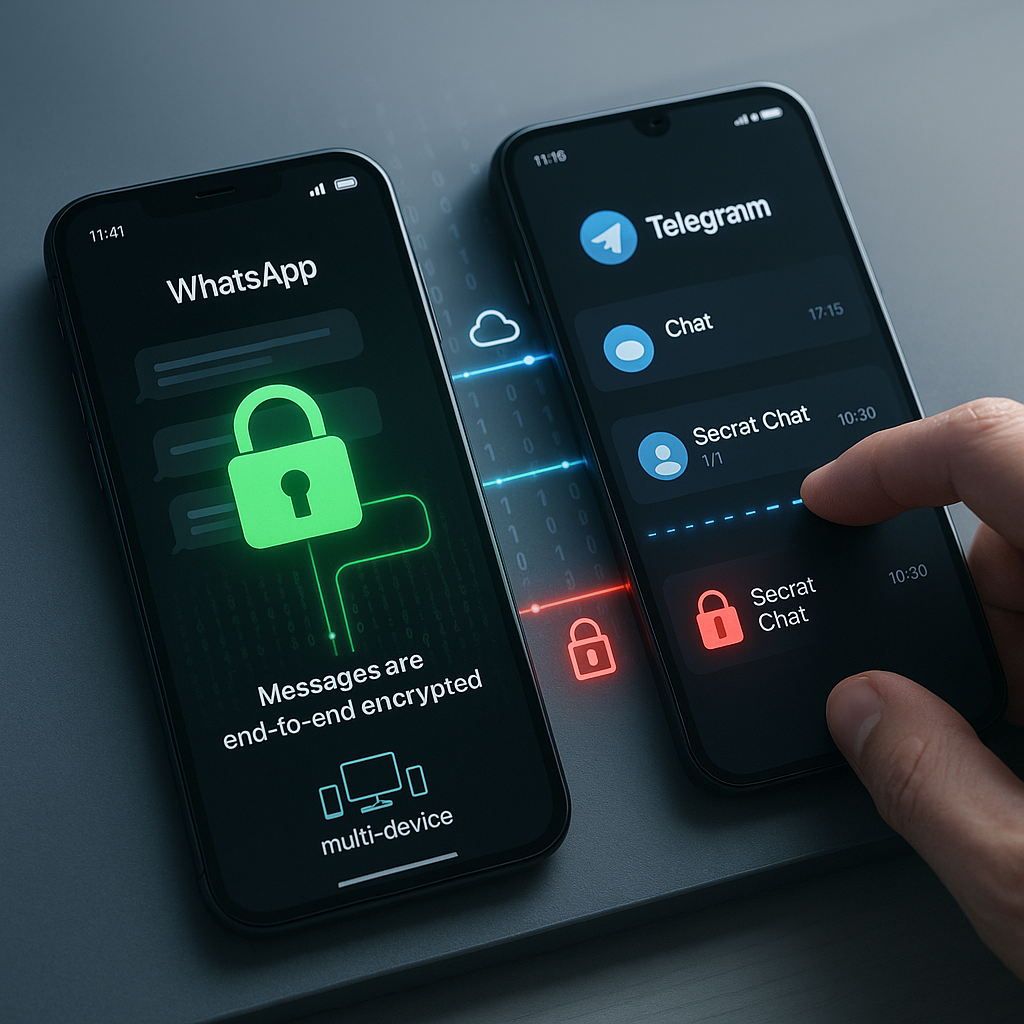
Universal encryption: WhatsApp protects every chat, on every device. The app enforces end-to-end encryption by default for all messages, group conversations, media, and calls, safeguarding every interaction regardless of platform or device. This ensures no chat is left exposed.
-
Telegram’s Secret Chat: Strong, yet restricted security. Telegram delivers robust end-to-end encryption in Secret Chats, but these are limited to a single device and cannot sync across other phones, tablets, or desktops. While this configuration maximizes privacy, it can be less convenient for those who rely on multiple devices.
-
Standard Telegram chats: Greater convenience, but a privacy trade-off. By default, Telegram’s regular chats are encrypted only in transit (“client-server encryption”). This means messages can be accessed by Telegram servers, setting a clear distinction from WhatsApp’s always-on, end-to-end approach.
-
Data collection: WhatsApp and Telegram diverge on user data. WhatsApp collects a wide range of metadata (phone numbers, contact lists, device info, usage data), whereas Telegram intentionally retains less sensitive data. Both platforms store some information to maintain functionality.
-
Business and compliance: WhatsApp leads in regulated sectors. Universal end-to-end encryption and dedicated business messaging compliance give WhatsApp a security edge for organizations in healthcare, finance, law, and other regulated industries. Telegram’s Secret Chats lack support for group or multi-device business use, limiting their practical utility in enterprise environments.
-
Self-destructing and disappearing messages: Similar, but not identical. Both apps allow disappearing messages, but Telegram provides enhanced controls like custom self-destruct timers within Secret Chats. WhatsApp offers a more standardized vanish option usable across all chats, though with fixed timeframes.
-
Message backups: A critical consideration. WhatsApp lets users enable encrypted backups, but this requires manual activation and cloud backups may introduce vulnerabilities if not properly configured. Telegram bypasses the traditional backup model entirely by storing regular chats on the cloud (excluding Secret Chats), making account protection even more essential.
-
Telegram’s device limitation: Practical privacy pitfalls. While Telegram’s Secret Chats theoretically deliver maximal message security, their single-device limitation means users seeking both privacy and seamless cross-device access may encounter unforeseen risks.
Understanding these nuanced privacy differences empowers you to select the app that aligns with your personal, professional, or enterprise needs. In the next sections, we will delve deeper into real-world scenarios, expert security comparisons, and tailored settings to help you optimize each app for the right balance of privacy and convenience.
Introduction
Choosing a messaging app today involves much more than picking between fun sticker packs and emoji support. It is a subtle decision that can significantly impact how much of your private information remains truly confidential. While WhatsApp and Telegram frequently top the lists of secure messaging solutions, the real privacy distinctions go beyond surface-level marketing claims about encryption and disappearing messages.
Given the rising frequency of data breaches and digital surveillance, the stakes are higher than ever. How these platforms handle security, user data, and multi-device access can fundamentally shape your digital safety. Making the right choice is essential whether you prioritize operational convenience or airtight privacy, especially for those sharing sensitive personal details, managing business conversations, or operating in regulated sectors. Let’s examine where WhatsApp and Telegram part ways on privacy, and highlight the critical considerations that should guide your decision.
Core Security Architecture
Encryption Implementation
Secure messaging starts with how each app approaches message encryption.
Un passo avanti. Sempre.
Unisciti al nostro canale Telegram per ricevere
aggiornamenti mirati, notizie selezionate e contenuti che fanno davvero la differenza.
Zero distrazioni, solo ciò che conta.
 Entra nel Canale
WhatsApp uses the respected Signal Protocol to enforce end-to-end encryption by default for every message, group chat, media file, and call. Each conversation uses unique encryption keys, and even WhatsApp itself cannot decrypt your messages. This means any sensitive information you share (business contracts, confidential health records, legal updates, financial data) is always accessible only to sender and recipient, across all platforms.
Telegram, on the other hand, operates on its proprietary MTProto encryption protocol. While this system offers strong security, only Secret Chats feature end-to-end encryption. Regular cloud chats are protected with client-server encryption, which secures data during transfer but allows storage and potential server-side access by Telegram. This difference is vital for users needing high-level confidentiality, such as legal professionals handling client communications or healthcare practitioners exchanging sensitive case data.
For a deeper dive into how these cryptographic protections work behind the scenes, our beginner-friendly guide End-to-End Encryption Made Easy breaks down what end-to-end encryption actually means, its core benefits, and why it matters for your daily privacy.
Authentication Methods
Authentication is key to preventing unauthorized access.
WhatsApp provides two-step verification (a PIN code supplementing standard phone verification) and supports device-level biometric security, like fingerprint or face unlock. This helps ensure that only verified users can access the app and its chats.
Telegram augments these basics with several advanced security controls:
- Two-step verification via a custom password and recovery process
- Real-time login authorization alerts
- Active session monitoring, displaying all logged-in devices
- The ability to terminate any session remotely
These features make Telegram appealing for users who demand granular control (IT professionals managing sensitive systems, business owners handling proprietary data, or educators regulating access to digital classrooms, just to name a few).
Privacy Features Comparison
Data Collection Practices
Understanding what data your messaging app collects is essential for overall privacy.
WhatsApp’s data collection has expanded under Meta. The app gathers:
- Phone numbers and full contact lists
- Device details (make/model, identifiers)
- Location data (when enabled)
- Usage analytics and diagnostics
- Information about interactions with business accounts
Telegram intentionally collects less:
- Basic device data and username
- IP address (kept for a limited period)
- Phone number (used for registration, not discovery)
- Telegram does not store message content for regular cloud chats
For professionals in industries like healthcare (HIPAA-regulated) or finance (GDPR, PCI compliance), these policies could guide the app selection process.
Message Retention and Storage
Where your messages are stored and how long they are kept affects both privacy and convenience.
WhatsApp stores messages locally on the device, with optional encrypted backups to Google Drive or iCloud. If not encrypted, these backups could create vulnerabilities if a cloud provider account is compromised. WhatsApp retains very limited server-side data, holding some metadata and only temporarily storing undelivered messages.
Telegram offers:
- Cloud storage for regular chats (accessible across devices)
- Complete message removal features for chats or entire conversations
- Secret Chats with self-destruct or timed deletion capabilities
- Server-side message retention policies that users can customize
Such flexibility can be especially appealing in industries requiring strict record retention policies or rapid deletion of sensitive communications.
If you’re looking for more practical WhatsApp controls to boost privacy, check out our collection of Hidden WhatsApp Tricks—these tips help prevent unwanted data exposure and empower personalized management of your digital history.
Un passo avanti. Sempre.
Unisciti al nostro canale Telegram per ricevere
aggiornamenti mirati, notizie selezionate e contenuti che fanno davvero la differenza.
Zero distrazioni, solo ciò che conta.
Entra nel Canale
Advanced Security Features
Group Chat Security
Group chats can involve sensitive discussions among multiple participants (business teams, legal advisors, or parent-teacher associations).
WhatsApp secures both group and individual chats with end-to-end encryption. Group admins can:
- Restrict who can post or add new members
- Approve participant invitations
- Enable disappearing messages to control information lifespan
Telegram raises the bar in group security by supporting massive group sizes, granular admin permissions, advanced anti-spam filters, and private invitation links. Its options benefit businesses managing large teams, marketing agencies orchestrating customer feedback groups, or online educational communities.
File Sharing Protection
File sharing is integral to modern messaging, whether you are distributing homework assignments, financial documents, or patient data.
WhatsApp scans files for viruses (up to 100MB per file) and encrypts all media in transit. Files saved to device storage may be susceptible if the device is compromised.
Telegram sets itself apart with:
- End-to-end encrypted file transfer in Secret Chats
- Support for very large files (up to 2GB)
- Secure, cloud-based storage of shared media
- Self-destruct timers for files, ideal for legal or business documents with time-limited relevance
These capabilities are particularly valuable for creative professionals, project managers, and those who frequently exchange high-volume or confidential material.
Multi-Device Functionality
Security Across Devices
Seamless, secure multi-device access is increasingly important as users work and communicate across laptops, tablets, and smartphones.
WhatsApp’s multi-device feature keeps end-to-end encryption intact across up to four independent devices, ensuring robust security regardless of which device is used. Each device is authenticated individually and maintains secure communication channels.
Telegram enables cloud-based chat synchronization by default for regular messages, supporting convenient access across devices without complicated logins. However, Secret Chats are limited to the single device where they began. Users must be aware of this trade-off, especially those who divide their workflow between a phone, work computer, or tablet.
For those seeking more advanced comparisons and a technical rundown of how WhatsApp and Telegram differ in approach, our detailed guide Telegram vs WhatsApp: Which Secure Chat App Protects Your Privacy Best? offers a data-driven breakdown of security models, metadata handling, and best practices for protecting your digital life.
Backup Security
Protecting chat history and backups is crucial for both disaster recovery and privacy.
WhatsApp provides options for local or cloud backups, each potentially encrypted. Users can exclude particularly sensitive chats from backup, and some platforms (like Android) enable device-level encryption by default. Failure to enable backup encryption, however, may expose user data if the cloud service is breached.
Telegram, by relying on cloud storage, removes the need for conventional backups. Chats are always synchronized across devices where the account is active. Still, users can export data locally and customize how long message history is retained. Secret Chats, as always, are excluded from server storage.
Vulnerability Management
Security Update Frequency
Staying ahead of emerging threats requires active vulnerability management.
WhatsApp maintains regular and responsive patch cycles, typically issuing monthly updates or immediate fixes for critical issues. Bug bounties encourage independent security research and rapid reporting.
Telegram demonstrates similar dedication with prompt updates, public audits, and open-source client code, allowing for community scrutiny and continued improvement.
These practices are more important than ever for organizations in high-risk sectors, such as fintech, legal, or public sector communications.
Known Security Issues
No platform is immune to weaknesses.
WhatsApp has encountered challenges with:
- Potential exposure of user metadata
- Weaknesses in backup encryption (when not enabled)
- Risks via public group invitation links
- Security of media files stored on devices
Telegram’s main concerns involve:
- Non-default end-to-end encryption in regular chats
- Periodic criticism of the proprietary MTProto protocol
- Privacy trade-offs with cloud storage
- Group membership visibility, which can affect user anonymity
These issues underscore the importance of app selection based on specific threat models and usage patterns, especially in compliance-heavy industries.
If your primary concern is broader digital security beyond messaging, see our essential Cyber Hygiene Checklist for practical steps to defend your accounts, data, and privacy across all platforms.
Conclusion
The privacy and security distinctions between WhatsApp and Telegram demonstrate two fundamentally different philosophies. WhatsApp prioritizes universal end-to-end encryption, strong device controls, and optional encrypted backups, delivering consistent protection well-suited for most users, including professionals in sensitive or regulated fields. Concerns do remain about its parent company Meta and the extent of metadata collection, prompting some users to seek alternatives.
Telegram, in contrast, focuses on advanced authentication, flexible group controls, and expansive file sharing. This approach appeals to users who need customization and powerful multi-device functionality. However, since end-to-end encryption is exclusive to Secret Chats and not available by default, users must proactively enable extra security measures for truly confidential conversations.
For every user (business, healthcare, legal, education, marketing, or government) the best choice depends on your operational requirements and privacy expectations. Assessing default encryption, transparency, data storage options, and compliance features is essential for safeguarding your digital communications. As messaging platforms continue to evolve and competition intensifies, those who adopt adaptable, security-first strategies will be in the best position to maintain privacy and trust in a fast-changing digital world.
The key question is not just which app you choose, but how effectively you leverage their strengths to protect what matters most.




Leave a Reply